Note
Go to the end to download the full example code.
Comparing Two Models
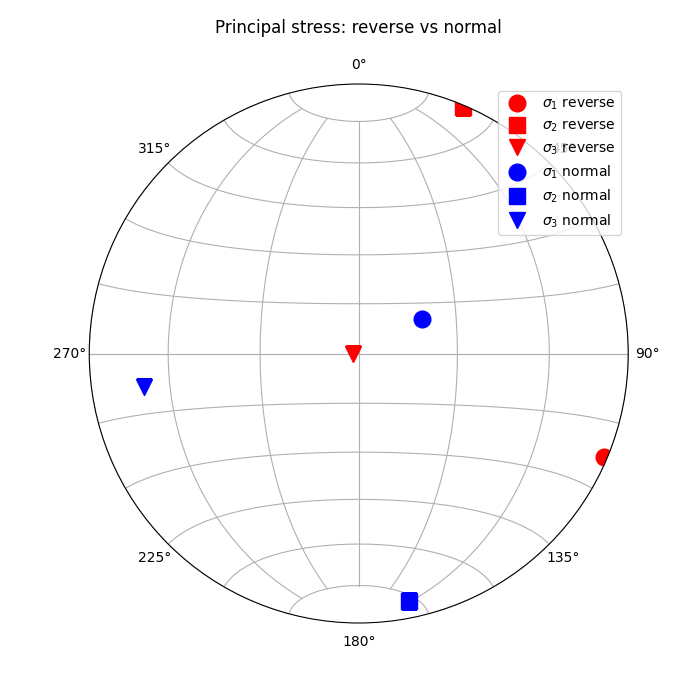
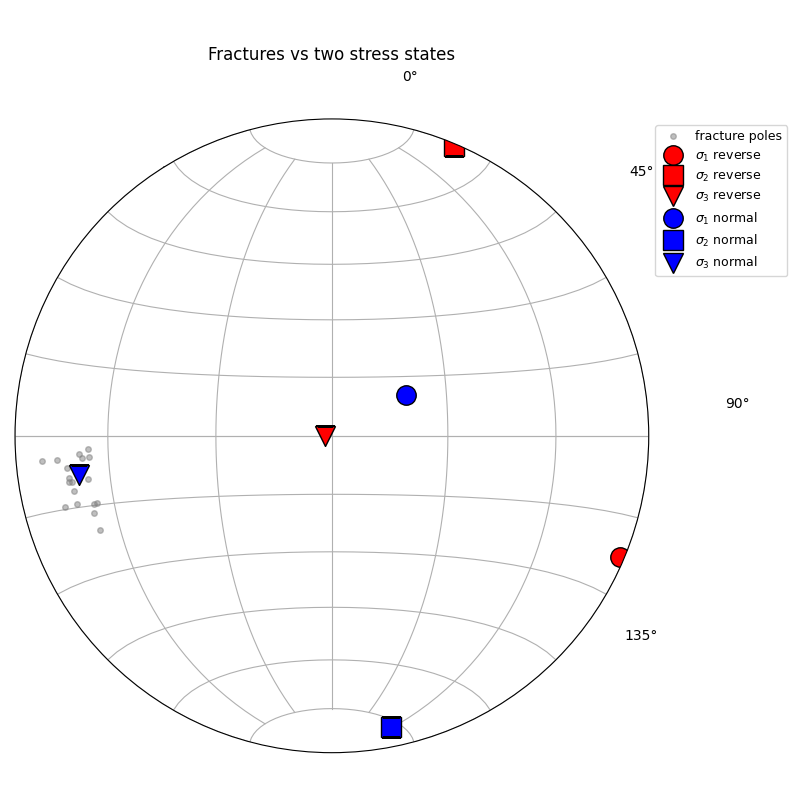
Load two solver runs of the same region: a reverse-fault experiment and a normal-fault experiment. Plot their principal directions on one stereonet. Then overlay a fracture population and see which model is more consistent with the measurements.
Setup
import os

import matplotlib.pyplot as plt
import mplstereonet  # noqa: F401

from fem2geo import Model, dir_testdata
from fem2geo.internal.io import load_structural_csv
from fem2geo.plots import stereo_axes, stereo_pole
Loading two models
Both files live in the tutorials data directory. They use the same schema.
reverse = Model.from_file(
    os.path.join(dir_testdata, "reverse_fault.vtu"), schema="adeli3"
)
normal = Model.from_file(
    os.path.join(dir_testdata, "normal_fault.vtu"), schema="adeli3"
)

print("reverse:", reverse.n_cells, "cells")
print("normal: ", normal.n_cells, "cells")
reverse: 52388 cells
normal:  42106 cells
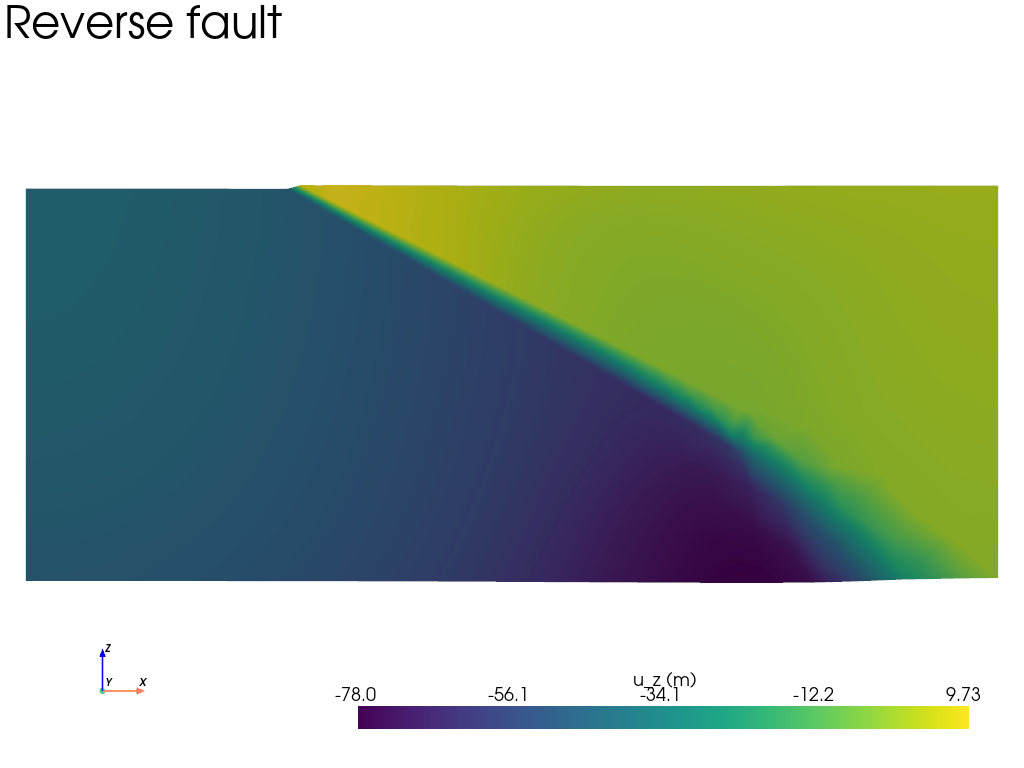
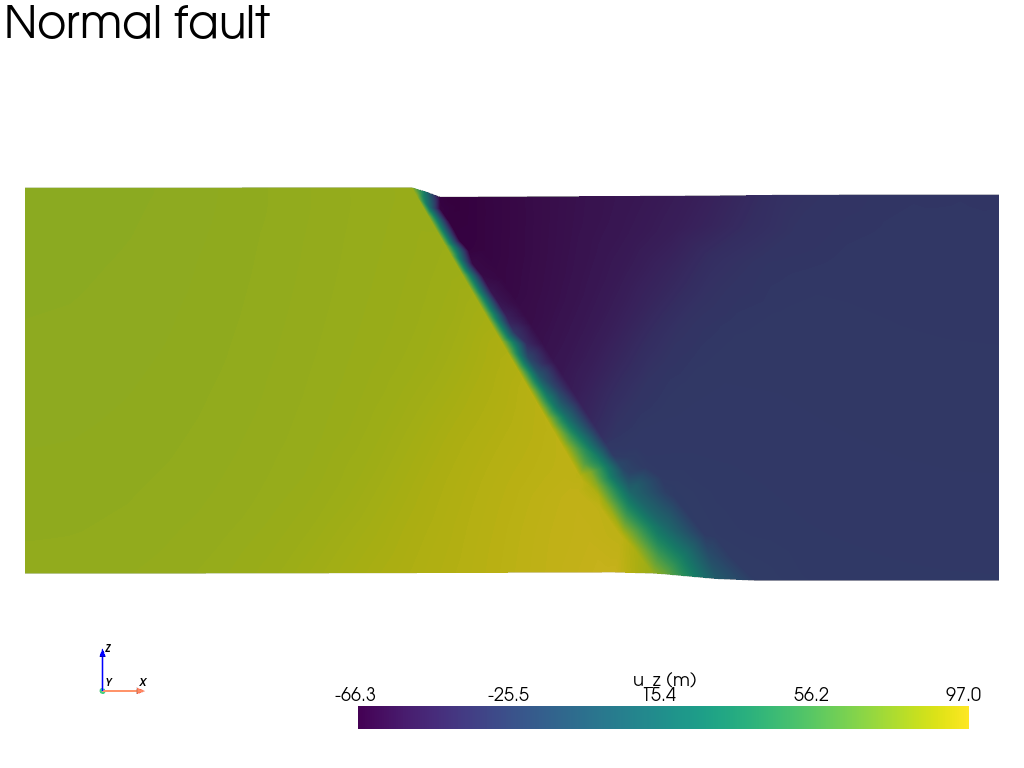
We plot a slice for each model at the same place.
sl = reverse.grid.slice(normal="y", origin=(0, 5000, 0))
sl.plot(
    scalars="u",
    component=2,
    cpos="xz",
    zoom=1.4,
    text="Reverse fault",
    scalar_bar_args={"title": "u_z (m)"},
)

sl = normal.grid.slice(normal="y", origin=(0, 5000, 0))
sl.plot(
    scalars="u",
    component=2,
    cpos="xz",
    zoom=1.4,
    text="Normal fault",
    scalar_bar_args={"title": "u_z (m)"},
)
Picking a common site
The two models share the same geometry, so the same center and radius work for both.
Principal stress in both models
One call per model gives the eigenvalues and eigenvectors of the averaged stress tensor at the site. Since the site is the same, any difference is purely due to the loading conditions of each experiment.
Both on one stereonet
Drop both sets of axes into the same stereonet with different colors.
fig = plt.figure(figsize=(7, 7))
ax = fig.add_subplot(111, projection="stereonet")
ax.grid(True)

stereo_axes(
    ax, vec_rev,
    style={"color": "red", "markersize": 12},
    labels=(r"$\sigma_1$ reverse", r"$\sigma_2$ reverse", r"$\sigma_3$ reverse"),
)
stereo_axes(
    ax, vec_nor,
    style={"color": "blue", "markersize": 12},
    labels=(r"$\sigma_1$ normal", r"$\sigma_2$ normal", r"$\sigma_3$ normal"),
)
ax.legend()
ax.set_title("Principal stress: reverse vs normal", y=1.08)
Text(0.5, 1.08, 'Principal stress: reverse vs normal')
Loading fracture measurements
A CSV with strike and dip columns becomes a FractureData object
via load_structural_csv. The .planes attribute is a
(N, 2) numpy array of [strike, dip].
fractures = load_structural_csv(
    os.path.join(dir_testdata, "fractures_c.csv")
)
print(fractures)
print("shape:", fractures.planes.shape)
FractureData(20 measurements)
shape: (20, 2)
Fractures vs both models
Draw the fractures poles (one point per plane) and place the principal directions of each model on top. A fracture population that aligns with \(\sigma_3\) of a model is consistent with that stress state.
fig = plt.figure(figsize=(8, 8))
ax = fig.add_subplot(111, projection="stereonet")
ax.grid(True)

# fractures as poles
stereo_pole(
    ax, fractures.planes,
    marker="o", color="grey", markersize=4, alpha=0.5,
    label="fracture poles",
)

# reverse model principal directions
stereo_axes(
    ax, vec_rev,
    style={"color": "red", "markersize": 14, "markeredgecolor": "k"},
    labels=(r"$\sigma_1$ reverse", r"$\sigma_2$ reverse", r"$\sigma_3$ reverse"),
)

# normal model principal directions
stereo_axes(
    ax, vec_nor,
    style={"color": "blue", "markersize": 14, "markeredgecolor": "k"},
    labels=(r"$\sigma_1$ normal", r"$\sigma_2$ normal", r"$\sigma_3$ normal"),
)

ax.set_title("Fractures vs two stress states", y=1.08)
ax.legend(loc="upper left", bbox_to_anchor=(1.0, 1.0), fontsize=9)
plt.tight_layout()
/home/docs/checkouts/readthedocs.org/user_builds/fem2geo/checkouts/latest/tutorials/examples/02_comparing_models.py:162: UserWarning: This figure includes Axes that are not compatible with tight_layout, so results might be incorrect.
  plt.tight_layout()
At multiple sites
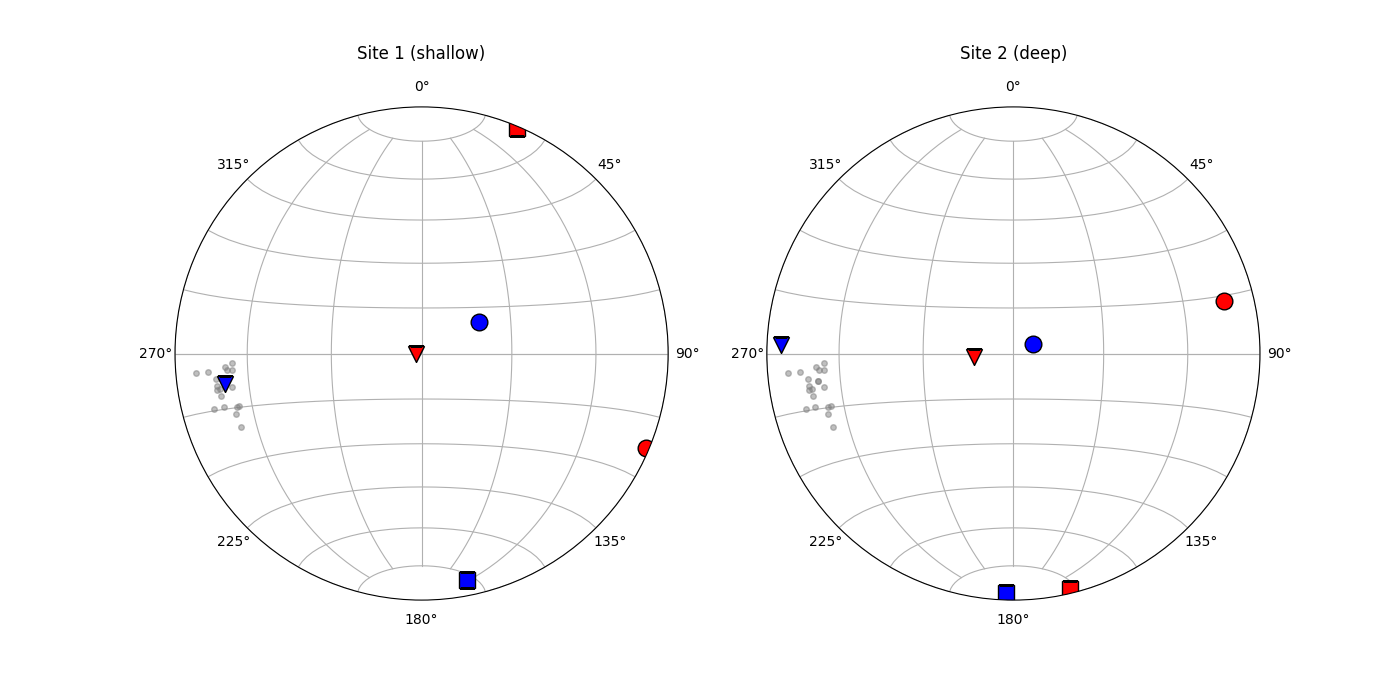
Here are two sites side by side, each comparing the two models against the fractures.
sites_info = [
    ("Site 1 (shallow)", [8000, 6000, -1500]),
    ("Site 2 (deep)",    [8000, 6000, -2500]),
]

fig, axes = plt.subplots(
    1, 2, figsize=(14, 7),
    subplot_kw={"projection": "stereonet"},
)

for ax, (name, ctr) in zip(axes, sites_info):
    sub_r = reverse.extract(center=ctr, radius=radius)
    sub_n = normal.extract(center=ctr, radius=radius)
    _, vectors_r = sub_r.avg_principals("stress")
    _, vectors_n = sub_n.avg_principals("stress")

    ax.grid(True)
    stereo_pole(
        ax, fractures.planes,
        marker="o", color="grey", markersize=4, alpha=0.5,
    )
    stereo_axes(
        ax, vectors_r,
        style={"color": "red", "markersize": 12, "markeredgecolor": "k"},
        labels=(r"$\sigma_1$ rev", r"$\sigma_2$ rev", r"$\sigma_3$ rev"),
    )
    stereo_axes(
        ax, vectors_n,
        style={"color": "blue", "markersize": 12, "markeredgecolor": "k"},
        labels=(r"$\sigma_1$ nor", r"$\sigma_2$ nor", r"$\sigma_3$ nor"),
    )
    ax.set_title(name, y=1.08)
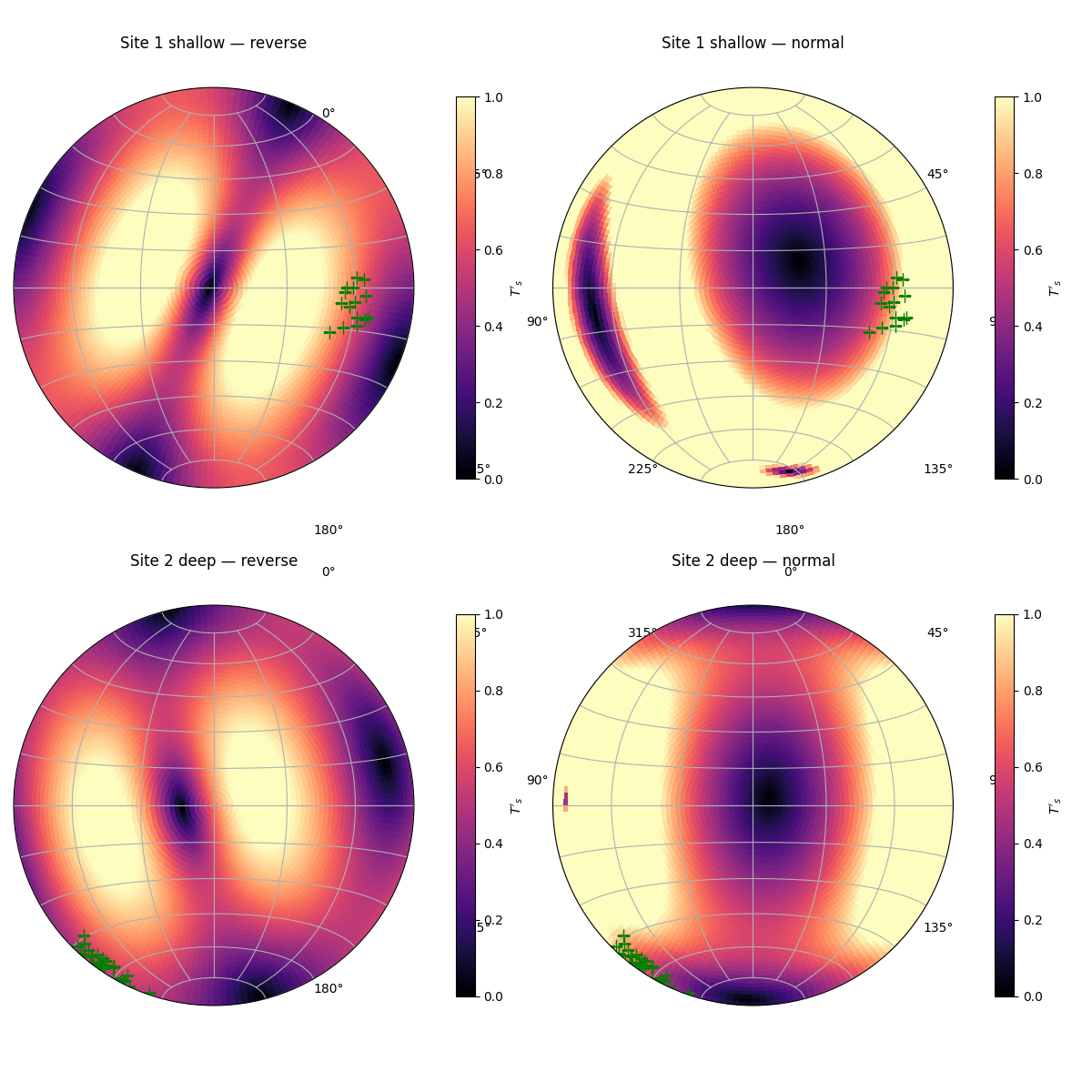
Slip tendency for two fault sets
Each model has its own stress state at each site. We plot the slip tendency field of that stress state as a stereonet contour, then overlay the observed fault poles on top.
from fem2geo.plots import stereo_field
from fem2geo.utils.tensor import slip_tendency
from fem2geo.utils.transform import grid_nodes, grid_centers

faults_a = load_structural_csv(os.path.join(dir_testdata, "faults.csv"))
faults_b = load_structural_csv(os.path.join(dir_testdata, "faults_b.csv"))

ms, md = grid_nodes(180, 45)
cs, cd = grid_centers(ms, md)

fig, axes = plt.subplots(
    2, 2, figsize=(12, 12),
    subplot_kw={"projection": "stereonet"},
)

cases = [
    ("Site 1 shallow", [8000, 6000, -1500], faults_a),
    ("Site 2 deep",    [8000, 6000, -2500], faults_b),
]

for row, (name, ctr, fd) in enumerate(cases):
    sub_r = reverse.extract(center=ctr, radius=radius)
    sub_n = normal.extract(center=ctr, radius=radius)
    T_r = sub_r.avg_tensor("stress")
    T_n = sub_n.avg_tensor("stress")

    ts_r = slip_tendency(T_r, cs.ravel(), cd.ravel()).reshape(cs.shape)
    ts_n = slip_tendency(T_n, cs.ravel(), cd.ravel()).reshape(cs.shape)

    for col, (vals, label) in enumerate([(ts_r, "reverse"), (ts_n, "normal")]):
        ax = axes[row, col]
        ax.grid(True)
        stereo_field(
            ax, ms, md, vals,
            cmap="magma", vmin=0.0, vmax=1.0,
            cbar=True, cbar_label=r"$T'_s$",
            cbar_kwargs={"shrink": 0.7},
        )
        stereo_pole(
            ax, fd.planes[:, 0], fd.planes[:, 1],
            marker="+", color="green", markersize=10,
        )
        ax.set_title(f"{name} — {label}", y=1.08)

plt.tight_layout()
/home/docs/checkouts/readthedocs.org/user_builds/fem2geo/checkouts/latest/tutorials/examples/02_comparing_models.py:256: UserWarning: This figure includes Axes that are not compatible with tight_layout, so results might be incorrect.
  plt.tight_layout()
Total running time of the script: (0 minutes 1.755 seconds)
Gallery generated by Sphinx-Gallery